How BusStop works?
BusStop is built to simplify repetitive API testing workflows. Instead of manually changing inputs, re-running requests, and checking responses one by one, BusStop helps you configure reusable test data, add built-in response validations, and execute test cases in bulk. The goal is to make API regression testing faster, more consistent, and easier to repeat during every release cycle.
Review and Verify the Results
Once the execution is completed, the next step is to review the results and verify whether the API behavior matches the expected outcome.
BusStop helps testers quickly identify failed validations and refine the expected results without repeating the entire setup process.
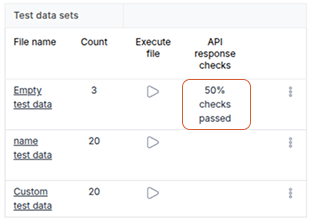
Analyze the Execution Results
After execution, BusStop compares the API response with the configured expected response and displays the validation results.
The system highlights:
- Passed test cases
- Failed test cases
- Validation mismatches
- Missing attributes
- Incorrect values
- Response structure differences
This allows testers and test managers to quickly understand:
- Which APIs failed
- Why the validation failed
- Whether the issue is in the API or in the expected configuration
Update Failed Test Cases
For failed scenarios, you can directly update the expected response and validation configuration from the test data management section.
This is useful when:
- APIs are evolving frequently
- Response structures change during development
- Validation rules need refinement
- Teams want tighter verification logic
How to Update Expected Results
1. Open the Test Data Settings
Click on: settings -> Manage Data test
.png)
2. Open the Test Case
BusStop redirects you to the Manage Data page. Locate the required test case and click on Edit.
.png)
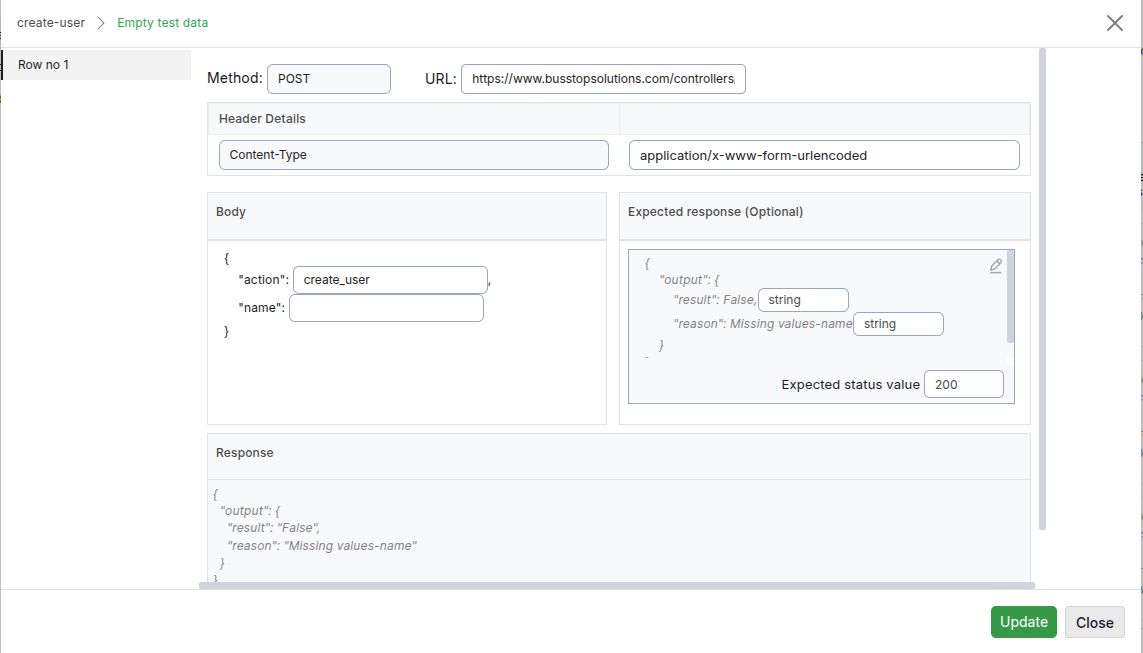
3. Update the Expected Response
The system opens a popup containing:
- Existing configuration
- Request data
- Expected response
- Validation settings
From here, you can update the expected API response based on the latest behavior.
Configure Advanced Validations
BusStop allows you to define how each response attribute should be validated.
Instead of only checking exact values, you can configure validation types such as:
- Integer
- Float
- Boolean
- String
- Exact string
- Null
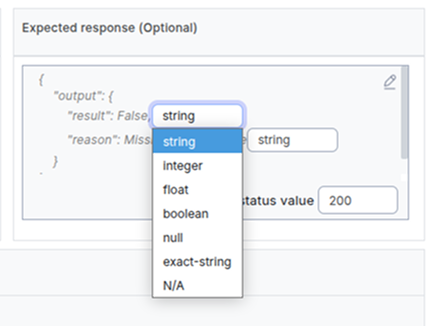
Example: For checking a API response {“status”: “success”, “amount”:200, “is_active”:true, “datetime”: “20260101200405”}
You can configure validations like:
- status should be a string
- amount should be an integer
- is_active should be boolean
- datetime can be set as N/A if its not required for validation
This makes validations more flexible and reduces false failures during regression testing.
Save and Re-evaluate
After updating the validation rules or expected response:
- Click on Save
- BusStop automatically re-evaluates the test case
- Updated results are reflected immediately
This helps teams refine validations quickly without manually rerunning and checking responses repeatedly.
Why This Matters
In traditional API testing workflows, failed test cases often lead to:
- Manual response comparison
- Repeated debugging
- Confusion between API issues and validation issues
- Time lost updating spreadsheets or scripts
BusStop simplifies this process by giving teams a centralized way to:
- Review failures
- Update expectations
- Improve validations
- Re-check results quickly
This creates a smoother regression workflow where testers spend more time validating business logic and less time managing repetitive verification tasks.
 Configure test data for an API endpoint
 Review only the failed cases
 Like what you read?
Be updated with feature updates, promotional offers, latest content and more from BusStop - API Automation testing tool.