API Status Explained
HTTP status codes communicate the outcome of an API request and play a critical role in how applications handle success, failure, and errors. This page explains commonly used API status codes and their meanings, helping testers and developers understand what each response indicates and how it should be interpreted during testing. Use this reference to quickly identify correct behavior, spot inconsistencies, and improve the reliability of API interactions.
HTTP Status Code 100 — Continue
When you send an API request, most responses are final — like 200 OK or 404 Not Found.But there’s a special response that plays the role of a pre-check: HTTP 100 Continue
This status code doesn’t say whether the request succeeded. Instead, it tells the client: “I received your request headers. If you want to send the rest (like the large body), go ahead!”
It’s like asking someone: “Is it okay if I send this big file?”And they reply: “Yes, continue.”
Why do we need 100 Continue?
Imagine uploading a 500MB video file. If the server is going to reject it anyway (maybe you’re not logged in or file is too large), why waste time and data sending the file?
HTTP 100 Continue helps avoid unnecessary uploads.
The workflow looks like this: Client sends headers (including Expect: 100-continue)Server checks:
- Are you authorized?
- Is the file allowed?
- Is the size acceptable?
Server replies with 100 Continue (if all good)Only then, client sends the bodyServer sends a final response (like 200 or 401)
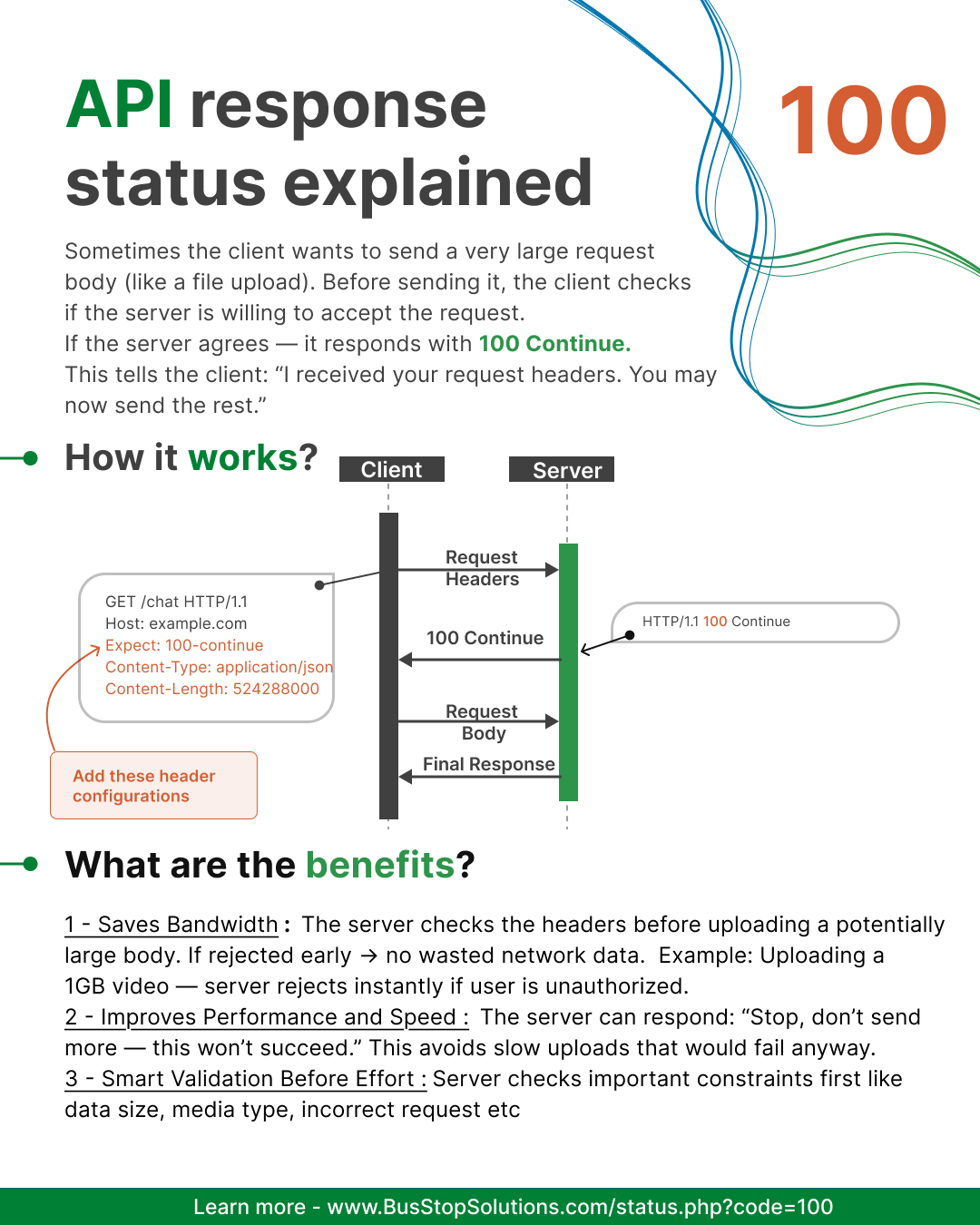
Benefits of 100 Continue
- Saves bandwidth : Before transferring gigabytes of data, the client checks if the server will accept it. Example: A user tries uploading a 500MB video — server checks permission first.
- Improves performance : The client doesn’t waste time sending data that will be rejected.Example: If the user is logged out, the server denies immediately — no long wait.
- Reduces server load: Less junk data is processed, especially when attackers try posting large requests. Example: A server blocks an oversized file upload without reading the whole body.
- Faster error feedback : If something is wrong, the server can fail early with a real error code (like 401 or 413). Example: Wrong MIME type? The server stops the upload right after headers.
- Supports smart streaming and chunked uploads: The handshake ensures each chunk is approved before continuing. Example: Cloud backup apps confirm health of connection before sending big data blocks.
- Avoids accidental denial of service situations : Prevents a single client from flooding the server with massive data. Example: Malicious script repeatedly attempts huge file uploads — server stops instantly.
When do we use it?
HTTP 100 Continue is mainly used when:
- Uploading large files
- Devices have slow or limited data
- Server needs to validate auth before upload
- Using chunked uploads or streaming APIs
Not common during simple JSON CRUD APIs — but essential for efficient file handling.
HTTP 100 Continue is a safety check that helps prevent wasting time and bandwidth on large API requests that might be rejected.
Hands-On Testing (Try in BusStop)
- Add header: Expect: 100-continue
- Watch the interim response first
- Ensure the final response is correct
Related topics
 101 - Switching Protocols
 100 - Continue
Like what you read?
Be updated with feature updates, promotional offers, latest content and more from BusStop - API Automation testing tool.